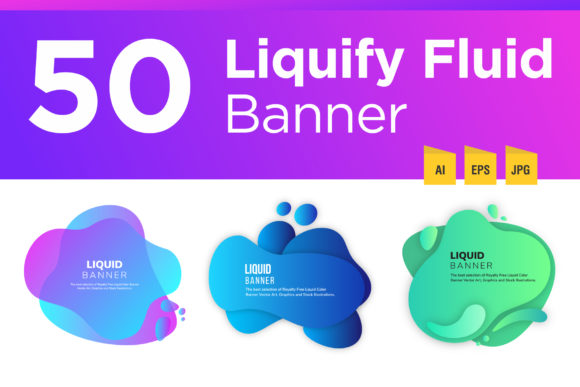
Dynamic Visuals with Liquefy Fluid Color Backgrounds
As a designer, I'm constantly hunting for assets that bridge the gap between high-end custom work and efficient, budget-friendly production. When I first opened the Liquefy Fluid Color Banner Background pack, I was immediately struck by its utility. This isn't just a random collection of colors; it is a curated set of 50 abstract, fluid designs that solve a very specific, common problem: making digital real estate look expensive and modern without spending hours crafting gradients from scratch. If you are a content creator, marketer, or small business owner trying to elevate your visual presence, understanding how to leverage these assets is key to a polished brand identity.
Deconstructing the Visual Language
The core appeal of the Liquefy Fluid Color Banner Background lies in its organic, free-form aesthetic. We are moving away from the rigid, geometric patterns of the past few years and leaning heavily into fluidity. These backgrounds mimic the behavior of liquids—viscous, flowing, and unpredictable. The "soft transition" mentioned in the file description is crucial here. Unlike harsh digital gradients, these files use complex color blending that feels almost tactile, similar to oil on water or slow-motion liquid art.
Visually, the pack offers a high degree of versatility. Because the shapes are abstract, they don't dictate a specific mood other than "modern" and "creative." They can feel energetic and vibrant when used with high-saturation colors, or they can feel calm and professional with muted pastels. This personality makes them an excellent foundation for a wide range of projects. They function less like a static image and more like a texture—a layer of depth that supports your foreground content rather than competing with it.
Strategic Applications for Modern Brands
One of the biggest challenges in digital marketing is maintaining visual consistency across different platforms. The dimensions for a YouTube header are vastly different from an Instagram Story or a Facebook ad. This is where the scalability of the Liquefy Fluid Color Banner Background shines. Being available in vector formats (AI and EPS) alongside JPEGs means you are not limited by resolution. You can stretch, crop, and manipulate these shapes to fit any aspect ratio without pixelation.
Here is how I recommend utilizing these assets for maximum impact:
- Website Hero Sections: Use a wide, horizontal slice of one of the fluid shapes as a background for your main headline. Pair it with a clean sans serif font to ensure readability. The abstract nature of the background adds visual interest without the distraction of a literal photograph.
- Social Media Consistency: For Instagram and Facebook, consistency is king. You can select five or six backgrounds from the pack that share a similar color palette and rotate them for your weekly posts. This creates a cohesive grid that looks intentional and professional.
- Podcast and Video Thumbnails: Thumbnails need to pop. A colorful, fluid background provides a high-contrast canvas for bold text. It helps your content stand out in a crowded feed.
- Presentation Decks: Corporate presentations often suffer from being boring. Swapping out standard white or grey backgrounds for a subtle, soft-focus fluid gradient can modernize a pitch deck instantly.
Pairing Typography with Fluid Shapes
A background is only as good as the typography placed on top of it. When working with the Liquefy Fluid Color Banner Background, your font choice is critical to maintaining visual hierarchy. Because the backgrounds are busy and colorful, your text needs to be assertive yet legible.
I generally advise against using script fonts or highly decorative handwritten fonts directly over the busiest parts of the fluid shapes. The competing curves can make the text unreadable. Instead, consider these pairings:
- Bold Sans Serifs: Fonts like Montserrat, Bebas Neue, or Impact work well. The clean, geometric lines of a sans serif font contrast beautifully with the organic, flowing shapes of the background. This juxtaposition creates a dynamic tension that feels energetic.
- Modern Serifs: If your brand leans more editorial or luxurious, a sharp serif font (like Playfair Display) can work, provided you place a semi-transparent overlay or a solid shape behind the text to ensure the serifs remain legible.
- Monospaced Fonts: For a tech-forward or "hacker" aesthetic, monospaced fonts look surprisingly good against these fluid backgrounds, grounding the organic shapes with rigid structure.
Practical Editing and Integration Tips
Since this pack includes vector files, you have total control over the color palette. A common mistake I see non-designers make is using the "out of the box" colors if they don't match their brand. Do not be afraid to open the EPS or AI file in Illustrator and adjust the hue and saturation. You can easily shift a pink fluid shape to match a corporate blue brand identity in just a few clicks.
Another practical tip involves the "Abstract blur free form shapes" aspect of the files. If the background feels too loud for a specific application, try reducing the opacity. Placing a white layer over the fluid background at 30% opacity can turn a vibrant banner into a subtle, pastel texture suitable for web design or packaging design mockups.
For those concerned about licensing, always double-check the terms for commercial use, especially if you are creating print design assets or merchandise. However, for digital social media graphics and headers, these assets are generally safe to use as part of a larger composition. The goal is to use these backgrounds as design assets that enhance your work, not replace it. By integrating the Liquefy Fluid Color Banner Background